How To · 8 min read · Sep 23, 2026
Creating a Shopify product listing that ranks, gets found by AI, and converts
Learn how to create a Shopify product listing that supports search, AI visibility, and conversion, with practical steps for titles, descriptions, category fields, and trust signals.
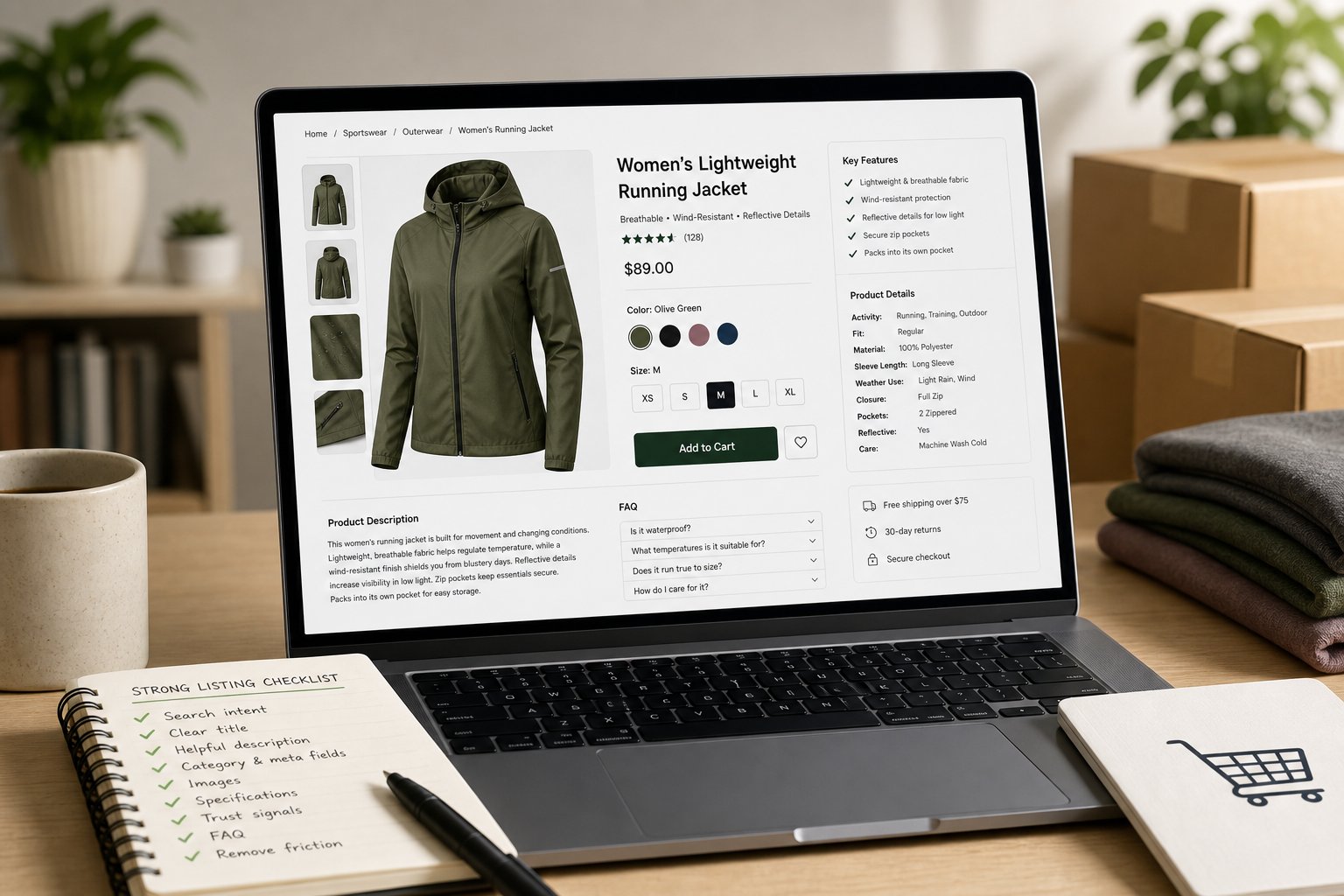
A strong Shopify product listing does more than describe an item. It gives shoppers, search engines, and AI systems the same clear signals about what the product is, who it is for, and why it belongs on the page. When those signals are incomplete or inconsistent, the product becomes harder to index, harder to compare, and harder to buy with confidence.
The best listings are built, not rushed. You need the title, description, images, category, category meta fields, and supporting details to work together. That is what gives a product the best chance of appearing in relevant searches, being understood by AI tools, and reducing hesitation at the point of purchase.
Start with the search intent behind the product
Before you write the listing, decide how a shopper is likely to look for the product.
You are not just naming an item. You are matching the language people actually use when they search. That usually means identifying:
- the product type
- the main use or outcome
- the material, size, fit, flavour, colour, or format
- the audience or occasion, when that is genuinely relevant
- the phrases a buyer would use when comparing options
For example, “water bottle” is broad. “Insulated stainless steel water bottle for commuting” is more precise and gives the page a clearer place in search.
That precision matters because it reduces guesswork. A listing that reflects real search language is easier to understand, easier to classify, and more likely to match the kind of query that leads to a sale.
Write a title that tells the truth fast
Your product title should tell a shopper what the item is at a glance. Keep it readable and natural. Add detail only where it helps the buyer choose.
A strong title usually includes:
- the product type first
- one key distinguishing feature
- any essential variant detail
- the brand name, if it adds recognition
Avoid loading the title with every keyword you can think of. A crowded title is harder to scan and often looks written for search engines rather than people. A title that reads cleanly is more likely to earn the click, because it feels more trustworthy.
If you sell several versions of the same product, make each title distinct enough to separate the variants. That helps the right page surface for the right search and reduces confusion for the shopper.
Build the description around buying questions
A Shopify description should not repeat the title. It should answer the questions the customer still has.
At minimum, cover:
- what the product is
- who it is for
- what it does or supports
- what makes it different from similar options
- what the shopper needs to know before buying
Short paragraphs work well. So do bullets for specifications or feature highlights. Keep the copy useful and direct, not decorative.
The common mistake is to leave key facts buried or missing. Dimensions, materials, compatibility, care instructions, contents of the box, sizing, or setup details should be visible where they matter. If a shopper cannot find those details quickly, the listing creates friction. Friction weakens trust and can interrupt conversion.
Populate category and category meta fields properly
This is one of the most overlooked parts of a Shopify listing, and one of the most useful.
Category data and category meta fields help organise the product in a structured way. They give Shopify more precise information about what the item is, which supports better filtering, cleaner browsing, and clearer data across similar products.
That matters for three reasons:
- it helps the right product sit in the right category
- it makes on-site filtering and comparison more useful
- it gives search and AI systems more structured information to work with
For example, if you sell a jacket, “clothing” is too broad to do much useful work on its own. A more precise category can separate outerwear from tops, while the meta fields can capture details shoppers often compare, such as material, fit, sleeve length, and season.
A practical Shopify example
Imagine you are listing a women’s running jacket.
- Category: Sportswear > Outerwear
- Category meta fields: gender, activity type, fabric, fit, sleeve length, weather use, closure type, pockets, reflective details
That structure gives the page a clearer identity than a loose description ever could. It also helps the product match browse filters, comparison tools, and the structured signals that AI systems use when interpreting product data.
If you leave those fields blank, or fill them in loosely, you make the product harder to sort and harder to understand. The listing may still exist, but it is working with less context than it should.
Make the listing understandable to AI as well as shoppers
A product page now has to do more than rank in search results. It also needs to be readable by AI-driven systems that summarise, recommend, and compare products.
That is where structured completeness matters. The page should tell the same story in every place:
- the title should match the product type
- the description should reinforce the same core facts
- the category should be accurate
- the category meta fields should add structured detail
- the imagery should show the product clearly
- the specifications should be consistent and extractable
If those elements disagree, the page becomes harder to trust. A polished layout with vague or conflicting details is less useful than a clear page that gives AI and shoppers the same answer.
For AI visibility, the practical rule is to remove guesswork. Use plain language, consistent naming, and complete fields. When product attributes are filled in properly, the page is easier for systems to parse and easier for people to compare.
Reduce hesitation with conversion details that matter
A listing can rank and still fail to convert if it leaves the shopper uncertain.
The product page should lower doubt. That usually means answering the objections that stop people from buying.
Look for the points that matter most:
- what is included
- how the product compares with the obvious alternatives
- whether it suits the buyer’s needs
- what the buyer should expect after purchase
- whether there are any limits, care needs, or compatibility rules
You do not need exaggerated claims. Clear features, honest specifications, direct language, and relevant imagery do more work than big promises.
A few practical conversion boosters often make a difference:
Add a short FAQ block
Use it for the questions people ask before they buy. Keep it specific to the product. If size, fit, setup, or maintenance commonly cause hesitation, answer those points directly.
Show trust signals near the purchase point
Delivery information, returns details, warranty terms, secure payment icons, and review summaries can all reduce uncertainty when they are placed where the shopper expects them.
Make shipping and returns visible
If a shopper has to search for delivery times or return terms, the page is doing extra work. Clear policy information near the buy button helps the buyer move forward with less friction.
Use comparisons where they genuinely help
If customers usually compare versions, sizes, or bundles, spell out the difference. A small comparison table can be more useful than a long paragraph.
A practical workflow for creating a stronger listing
If you want a reliable way to build a product page from scratch, use this sequence:
- Identify the real search phrase behind the product.
- Write a title that starts with the product type.
- Add one or two details that separate it from similar items.
- Draft a description that answers the buying questions.
- Fill in the category and category meta fields with precision.
- Add images that show the product clearly and honestly.
- Check that the title, copy, category, and fields all agree.
- Add trust signals, shipping details, and an FAQ where they are needed.
- Remove any line that does not help a shopper decide.
That workflow is practical because it forces the page to do the work a good listing should do: identify, explain, and reassure.
A weak listing versus a stronger one
A weak listing says too little. For example: “Premium organiser.”
A stronger listing says what the item actually is: “Desk drawer organiser for office supplies, bamboo finish.”
The second version gives the shopper a product type, a use case, and a clearer sense of category. If the category and category meta fields are also completed properly, the listing is easier to place, easier to filter, and easier to interpret.
That is the point. You are not trying to sound clever. You are trying to create a listing that is clear enough to rank, structured enough to be found by AI, and complete enough to convert.
The standard to aim for
A strong Shopify product listing is clear for the shopper, structured for search, and complete for AI systems.
If you want the best chance of ranking, showing up in AI-driven results, and improving conversion, focus on three things:
- accurate product naming
- complete category and category meta field data
- useful content that answers buying questions without hiding key facts
That is the foundation. Once that is in place, you can refine the wording, test images, and strengthen the supporting content around the page.
Create the listing with the same care you would use to turn your own ideas into on-brand content. Clarity first, structure second, polish last.
Was this article helpful?