How To · 7 min read · Oct 9, 2026
How to Write FAQ Content That Reduces Friction for Buyers
FAQ content works best when it removes hesitation, not when it repeats obvious questions. This guide shows how to choose real buyer concerns, answer them clearly and structure FAQs so they support trust and conversion.
FAQ content is often treated as a tidy end stop. Questions go there after the main page is finished, usually to cover loose ends. That is a weak use of the format.
A strong FAQ does decision support work. It deals with hesitation before it turns into drop-off, using answers that are specific enough to reassure a buyer without drifting into a full article. For content teams, support teams and product marketers, the job is not to collect obvious questions. It is to remove the small points of uncertainty that slow the buying path.
What a useful FAQ has to do
A useful FAQ answers a question a buyer is likely to ask before they ask it out loud. The question may be practical, commercial, technical or procedural, but it sits close to a decision.
It should do three things:
- name the concern the buyer actually has
- answer it directly, in plain English
- give enough detail to settle the point without burying the answer
That balance is where the value sits. Too little detail leaves the reader unsure. Too much turns the FAQ into a long-form page that is awkward to scan.
An FAQ also has to earn its space. If a question does not remove friction, clarify a choice or reduce avoidable support work, it probably belongs somewhere else.
Start with buyer friction, not with a content list
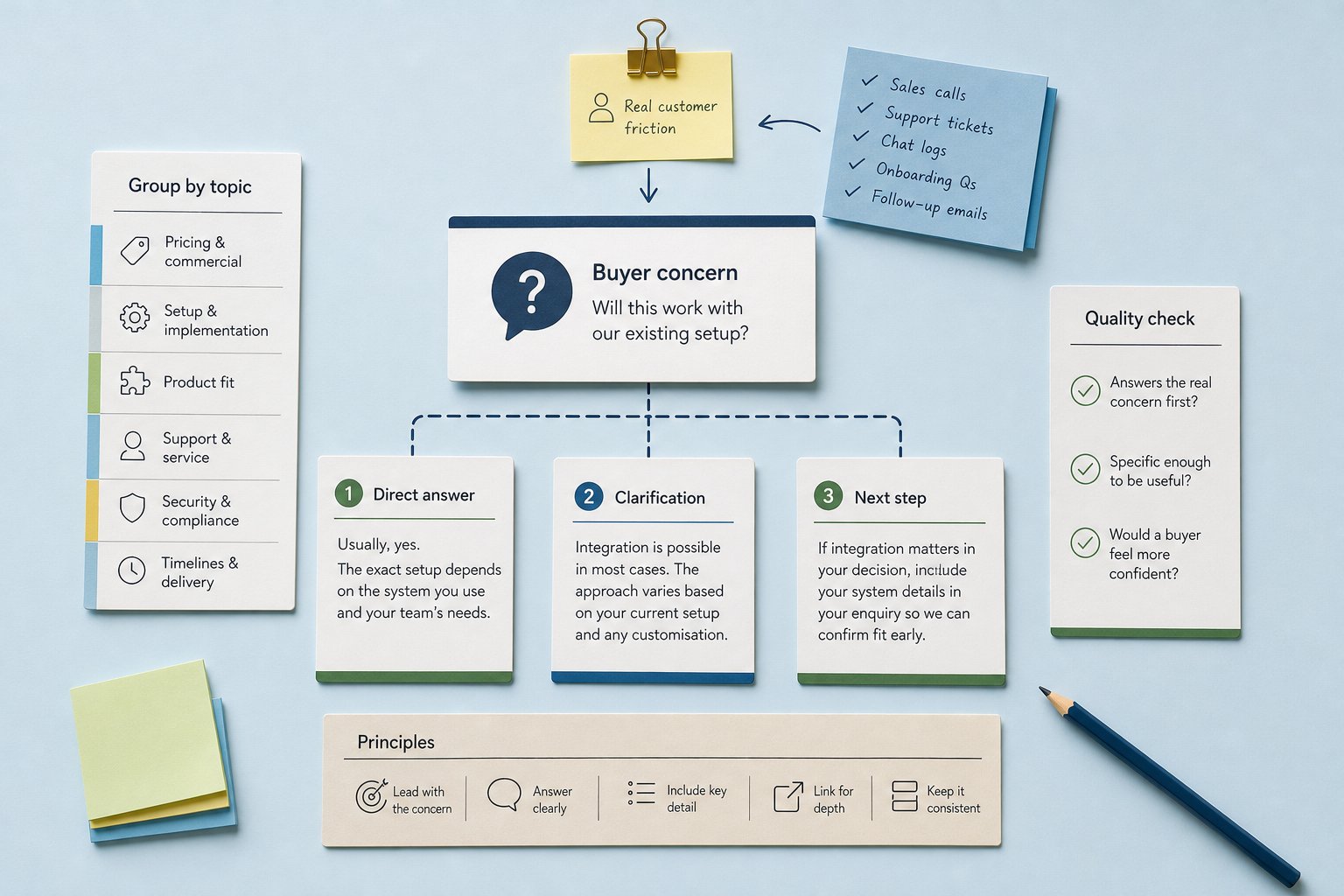
The strongest FAQ questions come from real customer language. Not from a brainstormed list of topics that sound complete on paper.
Look for friction in places where buyers already reveal it:
- sales conversations
- support tickets
- live chat logs
- demo follow-up emails
- onboarding questions
- notes from customer-facing teams
What matters is not just repeated wording, but repeated concern. The same issue may surface in different phrases. A buyer may ask, “Does this work with our current system?”, “Will it integrate?”, or “Can we keep our existing setup?” The wording changes. The underlying friction stays the same.
That is the question to write to.
If direct customer evidence is thin, use the buying decision as the filter. Ask which uncertainties are most likely to block the next step, then validate those questions with sales or support before publishing. That is still better than guessing at polite filler.
Write the answer to the concern first
An FAQ answer should not build up to the point. It should start there.
The first line needs to address the worry directly. Buyers scanning FAQs are usually looking for a quick read on fit, effort, risk or next steps. They do not need a warm-up paragraph.
A useful pattern is:
- Direct answer
- Short clarification
- Necessary condition, caveat or next step
For example, if the question is, “Can we use this with our existing system?”, a weak answer says, “Yes, we support a range of systems.” It sounds reassuring, but it does not resolve the real issue.
A stronger answer is:
“Usually, yes. The exact setup depends on the system you use and how much customisation your team needs. If integration is a key part of the decision, include the system name in your enquiry so the team can confirm fit early.”
That answer does more useful work. It is specific, candid and action-oriented.
Short is not the goal. Complete is the goal.
Use plain English throughout. If a technical term is necessary, define it in the same answer. If the explanation needs more than a few sentences to stay accurate, move the extra detail into deeper content rather than compressing it until it becomes vague.
Group questions by topic so buyers can find the right answer faster
Scanning is part of the content job. If a buyer has to hunt, the FAQ has already lost some of its value.
Group questions by topic where it helps the reader orient themselves. Common groups include:
- pricing and commercial questions
- setup and implementation
- product fit
- support and service
- security, compliance or policy
- timelines and delivery
This does more than tidy the page. It reduces search time and signals that the content has been thought through, rather than stitched together.
Within each group, order the questions by decision pressure. Put the questions most likely to block action near the top. If price, compatibility or turnaround time is the main concern, those questions should not be buried under lighter material.
Tone matters here too. Keep the answers steady. If a question is sensitive, answer it calmly and directly. Do not dress up uncertainty with extra words. Buyers can usually spot that move.
Build trust with consistency, not reassurance
A lot of FAQ content tries to sound helpful by sounding comforting. That often backfires.
Generic reassurance does not remove friction. It creates more of it, because the buyer still does not know whether the service fits, what the process involves or what happens next.
The better route is consistency. Use the same term for the same thing across the page. Keep answer length broadly aligned across similar questions. Avoid switching from crisp to defensive when the topic gets awkward.
A few practical habits help:
- phrase questions as questions
- keep answers concise but not clipped
- use whitespace so the page is easy to scan
- link out when a topic genuinely needs depth
- use the same labels and terms throughout
That kind of structure gives the page credibility. It feels edited, not assembled.
Rewrite weak FAQs so they answer the real issue
Some FAQ entries sound complete and still miss the point. They name a question, then dodge the concern behind it.
Take this weak answer:
“We’re committed to a positive customer experience.”
That is not an answer to a buyer’s concern. It is a positioning line.
A better version would be:
“If your main question is about response times, service hours or escalation, say so in your enquiry. The support team can confirm the process for your account before you commit.”
This version deals with the operational concern rather than the marketing gloss around it.
Another weak answer:
“Yes, we can help with onboarding.”
Better:
“Yes. Onboarding support covers setup, access and the first round of configuration. If your team needs migration or internal rollout support, that should be confirmed before purchase so the scope is clear.”
The difference is specific detail. The buyer can now see what is included, what may need extra discussion and what to ask next.
That is the standard FAQ content should meet.
Know when an FAQ needs to become deeper content
An FAQ should stay compact when the answer is narrow. It should expand when the topic becomes a decision in its own right.
Move a question into deeper content when it needs any of these:
- multiple scenarios
- step-by-step explanation
- comparison between options
- policy detail
- implementation guidance
- troubleshooting paths
A setup question may need two sentences on the FAQ page. A migration or integration question may need a full page because the buyer needs sequence, dependencies and caveats.
The FAQ should remove immediate hesitation. The deeper page should handle the topics that deserve room.
That split keeps the page useful. It also helps content teams keep structure under control. The FAQ answers the question that blocks progress. The supporting page handles the question that needs proper space.
Before you publish, test each answer against the buying decision
A quick review can catch most weak FAQ entries.
Ask:
- Does this answer the real concern first?
- Is it specific enough to be useful?
- Would a buyer feel more confident after reading it?
If the answer to any of those is no, the answer needs work.
One more check helps teams that need scalable, on-brand content: does the FAQ sound like it was written with brand knowledge and editorial judgement, or like it was filled in after the fact? The difference shows up fast in buyer-facing content.
For Hally Writer, that is the practical point. Better business content starts with better context. FAQ writing improves when the team understands which concerns matter, which ones need a short answer, and which ones should be expanded into something deeper.
FAQ content works best as decision support
The best FAQs do not sit on a page as filler. They behave like compact decision tools.
They name the friction, answer it plainly and give the buyer a clear next step. That makes the content more useful to the reader and more useful to the business.
Use real questions. Answer the concern directly. Keep the language plain. Expand only when the topic genuinely needs more room.
If a question does not reduce hesitation, it is not doing the job.
Was this article helpful?