Content Quality · 7 min read · Oct 9, 2026
Best Practices for Writing Pillar Pages That Hold a Topic Together
Pillar pages work best when scope, structure and internal links are planned together. Use these best practices to keep a topic clear, useful and easy to scale.
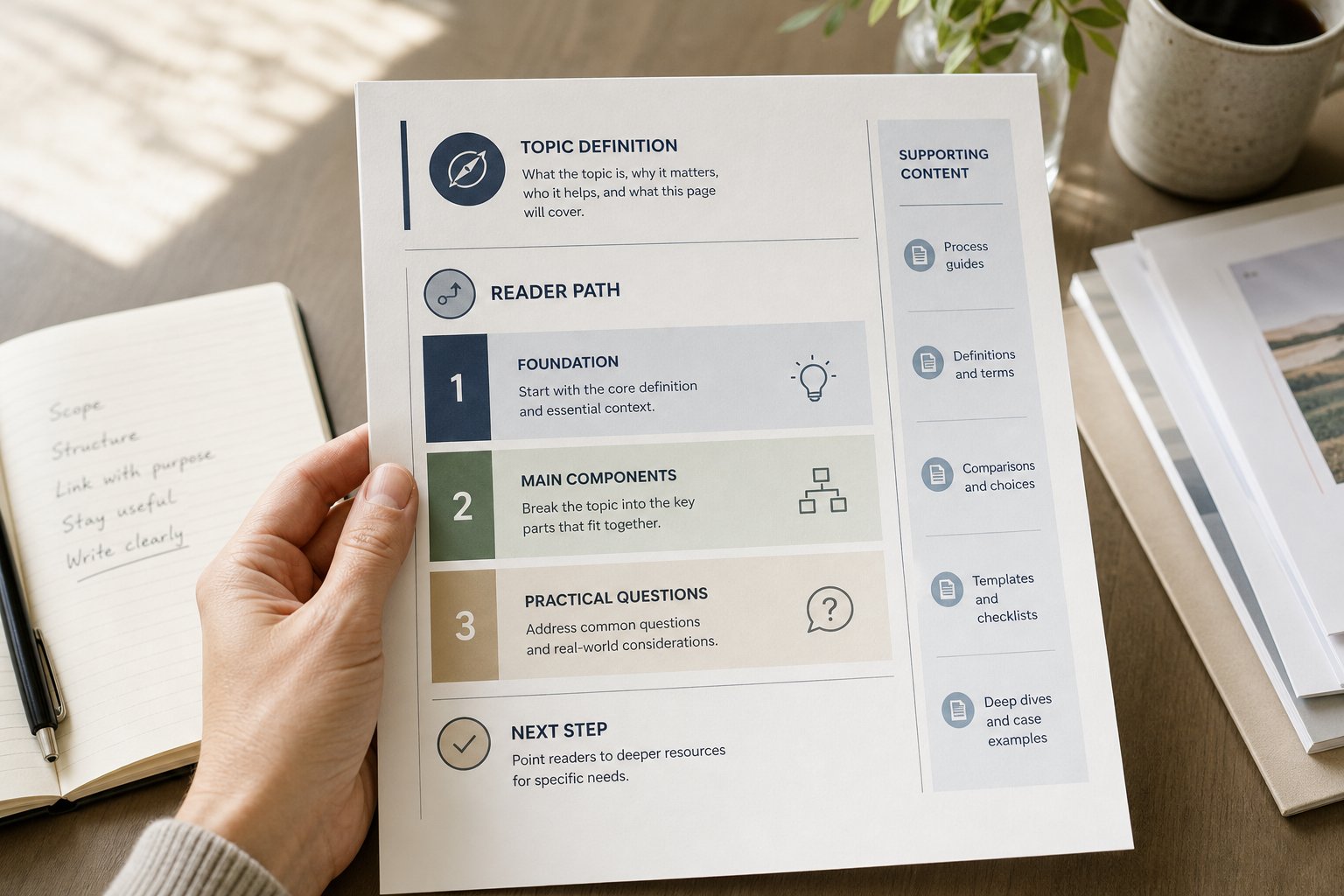
A pillar page fails when it tries to do too much at once. It becomes a long list of loosely related points, and the reader has to do the organising for themselves. A strong pillar page does the opposite: it defines the topic boundary, sequences the argument, and points cleanly to supporting content without losing focus.
For content strategists, SEO leads and writers, that is the real job. A pillar page is not just a long page on a broad subject. It is a structure that helps a topic stay coherent across multiple articles, while still being useful on its own.
What a pillar page is meant to do
A pillar page should give readers the shape of the topic.
That usually means three things:
- it explains the core subject in plain language
- it shows how the major parts of the subject fit together
- it connects to deeper content for readers who need more detail
If a pillar page cannot do those three things, it becomes either too thin to be useful or too broad to be manageable. The best pages are selective. They give enough context for orientation, then move the reader towards the right next step.
This is why pillar pages work best when they are written as content architecture, not as a catch-all article. The page needs a clear role in the system. It should hold the topic together, not attempt to replace every supporting piece.
Set the topic boundary before you write
Scope is the first decision, and often the most important one.
Before drafting, define what belongs on the page and what does not. That boundary stops the page from drifting into adjacent topics that deserve their own treatment. If the subject is too broad, the page will blur. If it is too narrow, it will not earn its place as a pillar.
A practical way to set scope is to ask:
- What is the central topic this page must explain?
- What subtopics are essential to understanding it?
- Which related areas should be covered in linked articles instead?
- What would make the page feel encyclopaedic rather than useful?
The point is not to cover everything. The point is to cover enough that the reader understands the topic and can choose where to go next.
For teams building topic-led content systems, this is also where brand knowledge matters. A good scope decision depends on how the subject sits inside the wider content architecture, not just on search volume or a keyword list.
Structure the page around the reader’s path
A pillar page needs sequence.
Readers do not arrive with the same level of understanding, so the page should move from basic orientation to more specific detail in a way that feels natural. That often means starting with the definition, then the main components, then the practical questions, and finally the linked support content.
Good structure makes the page easier to scan and easier to trust. The headings should show the shape of the topic clearly enough that a reader can understand the page without reading every paragraph. They should also help search engines interpret the hierarchy of the content.
A useful sequence might look like this:
Start with the core definition
Open with what the topic is, why it matters in practical terms, and where the page is going.
Move into the main parts of the topic
Group related ideas together so the page does not jump around. Each section should answer one distinct question.
Add depth only where it earns its place
If a subtopic needs more explanation than the pillar page can responsibly hold, flag it and link out.
The reader journey should feel intentional. A pillar page is not a pile of headings. It is a guided route through the subject.
Link to supporting content with purpose
Internal links should do more than fill space.
A strong pillar page introduces supporting content because the reader needs it, not because the site needs more links. Each link should answer a specific gap: a process, a definition, a comparison, a tactical guide, or a deeper explanation that would overload the pillar page if included in full.
That makes the link feel natural. It also protects the page from becoming a summary of summaries.
When adding links, keep the following in mind:
- link from a point of need, not from a generic “read more” moment
- use anchor text that tells the reader what they will get
- link out when a subtopic would interrupt the flow of the main page
- avoid linking so often that the page stops reading as a coherent whole
The best internal links feel like service. They help the reader continue the journey without forcing the pillar page to carry every detail.
Keep the page useful without making it encyclopaedic
A pillar page should be comprehensive enough to orient the reader, but not so full that it loses judgement.
That balance is difficult because teams often want the page to prove authority by adding more. In practice, authority comes from control. The page should include what matters most, explain it clearly, and know when to stop.
A useful test is this: if a section does not help the reader understand the topic, decide what to do next, or trust the page’s framing, it probably does not belong. Extra detail can make a page look thorough while making it harder to use.
This is also where editorial judgement matters. A pillar page is not just an SEO asset. It is a decision about what the page should carry, what supporting content should carry, and how the whole topic should stay readable as it scales.
Write for non-specialists without flattening the subject
If the page only makes sense to specialists, it is too narrow. If it strips out all precision, it becomes vague.
The right level is plain English with enough context to explain the subject properly. That means defining terms when they first appear, avoiding unexplained jargon, and writing each section so a non-specialist can follow the logic without needing prior knowledge.
A few practical rules help here:
- use short paragraphs and descriptive headings
- explain acronyms and internal terms on first use
- keep examples bounded and relevant to the point being made
- avoid assuming the reader knows the internal model behind the topic
Readable pillar pages usually feel calmer. They do not overstate. They do not race. They give the reader enough structure to understand the subject and enough clarity to keep going.
Examples of strong pillar page decisions
These examples show the kind of structural judgement that keeps a topic together.
Example: a broad service topic
If the topic is content strategy, the pillar page should not try to explain every tactical format in depth. It should define the discipline, outline the core areas, and link to separate articles on audits, planning, briefs and measurement.
Example: a process topic
If the topic is editorial workflow, the pillar page can cover the overall system, roles, handover points and review stages. Detailed templates, checklists and governance rules can sit in supporting articles.
Example: a specialist B2B topic
If the topic is brand context in content production, the pillar page should explain why context matters, what it contains and how it affects quality. It should not try to replace separate pieces on tone of voice, product knowledge or approval processes.
In each case, the pillar page does less than the full topic. That restraint is what keeps the page clear.
A pillar page should organise the topic, not exhaust it
The strongest pillar pages are built on scope, sequence and internal links. They give the topic a clear boundary, guide the reader through the main ideas, and send deeper questions to the right supporting pages.
For teams that need scalable, on-brand content, that structure matters. It is the difference between a page that simply covers a subject and a page that helps the whole content system work better.
If your pillar pages are starting to sprawl, the fix is usually not more content. It is better context, tighter structure and stronger editorial judgement.
Was this article helpful?